Lab3 Service Solution
Service ClusterIP
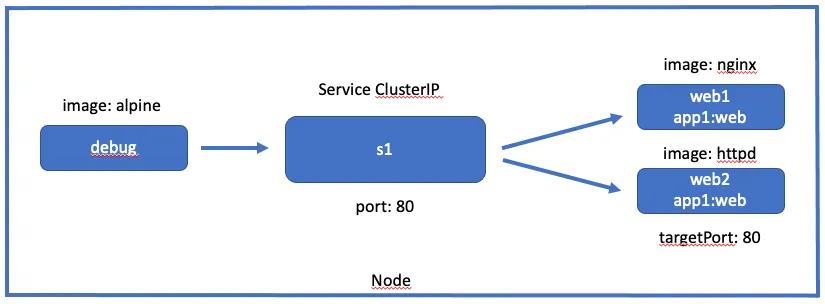
Créer un service nommé s1 de type ClusterIP rassemblant des pods ayant comme label app1=web
vi s1.ymlapiVersion: v1kind: Servicemetadata: name: s1spec: selector: app1: web type: ClusterIP ports: - port: 80 targetPort: 80Créer un pod web1 basé sur l’image nginx avec comme label app1=web
vi web1.ymlapiVersion: v1kind: Podmetadata: name: web1 labels: app1: webspec: containers: - name: nginx image: nginx:1.21-alpineCréer un pod web2 basé sur l’image httpd avec comme label app1=web
vi web2.ymlapiVersion: v1kind: Podmetadata: name: web2 labels: app1: webspec: containers: - name: nginx image: httpd:2.4-alpineCréer un pod debug basé sur l’image alpine
vi debug.ymlapiVersion: v1kind: Podmetadata: name: debugspec: containers: - name: debug image: alpine:3.13 command: ["sleep","3600"]Se connecter sur le pod debug et exécuter plusieurs fois la commande “curl s1”
Appliquer les spécifications
kubectl apply -f .pod/debug createdservice/s1 createdpod/web1 createdpod/web2 createdVisualiser les pods et le service
kubectl get svc,podsNAME TYPE CLUSTER-IP EXTERNAL-IP PORT(S) AGEservice/s1 ClusterIP 10.96.245.226 <none> 80/TCP 63s
NAME READY STATUS RESTARTS AGEpod/debug 1/1 Running 0 63spod/web1 1/1 Running 0 63spod/web2 1/1 Running 0 63sSe connecter sur le pod debug et exécuter plusieurs fois la commande “curl s1”
kubectl exec -it debug -- shapk add curlwhile truedocurl s1doneService NodePort
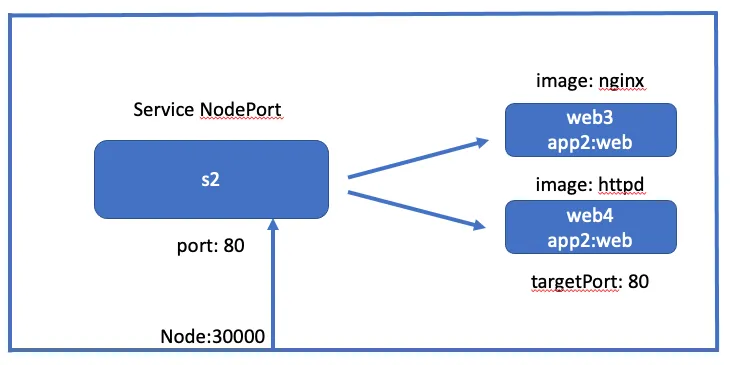
Créer un service nommé s2 de type NodePort rassemblant des pods ayant comme label app2=web
vi s2.ymlapiVersion: v1kind: Servicemetadata: name: s2spec: selector: app2: web type: NodePort ports: - port: 80 targetPort: 80 nodePort: 30000Créer un pod web3 basé sur l’image nginx avec comme label app2=web
vi web3.ymlapiVersion: v1kind: Podmetadata: name: web3 labels: app2: webspec: containers: - name: nginx image: nginx:1.21-alpineCréer un pod web4 basé sur l’image httpd avec comme label app2=web
vi web4.ymlapiVersion: v1kind: Podmetadata: name: web4 labels: app2: webspec: containers: - name: nginx image: httpd:2.4-alpineDepuis le poste de travail, exécuter plusieurs fois la commande “curl node1:30000”
Appliquer les spécifications
kubectl apply -f .service/s2 createdpod/web3 createdpod/web4 createdVisualiser les pods et le service
kubectl get svc,podsNAME TYPE CLUSTER-IP EXTERNAL-IP PORT(S) AGEservice/s2 NodePort 10.96.34.252 <none> 80:30000/TCP 57s
NAME READY STATUS RESTARTS AGEpod/web3 1/1 Running 0 57spod/web4 1/1 Running 0 57sDepuis le poste de travail, exécuter plusieurs fois la commande “curl node1:30000”
while truedocurl node1:30000done